


 RivetPanel
In development
Windows · macOS · Linux
Let your users ask for help without a portal login.
A lightweight tray and menu bar app that lets end users submit a RivetIT or RivetMSP support ticket, with an optional screenshot or file, in a few clicks. Built for mass deployment through your RMM, with the connection settings applied at install time so the end user never sees a credential.
Production release on January 1, 2027. RivetPanel is in development until then. See the roadmap.
Screens use fictional demo data.
How it works
From a deployed app to a ticket in your queue
Users never see a portal or a credential.
Set up once through your RMM, then your users just click.
-
Step 1
You deploy it
Push the installer through your RMM. The server address, API key and client ID are set at install time.
- Windows
- macOS
- Linux
-
Step 2
The user asks
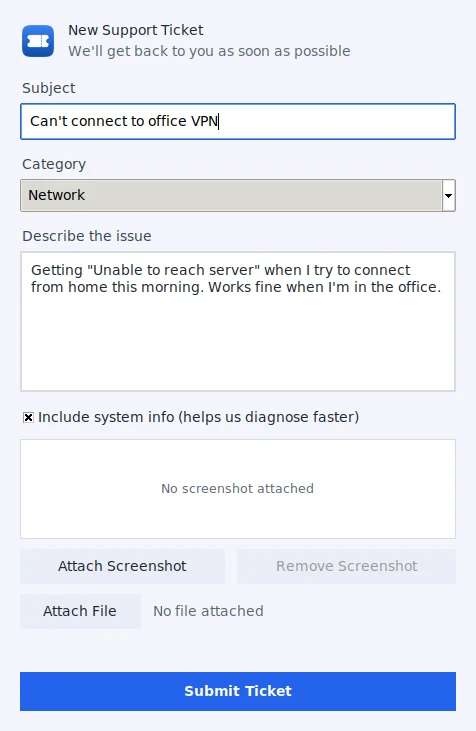
One click on the tray icon, a few words, an optional screenshot. No login.
- Screenshot
- File
-
Step 3
A ticket appears
Created through the API and linked to the computer, with the system info attached.
- Asset match
-
Step 4
You answer
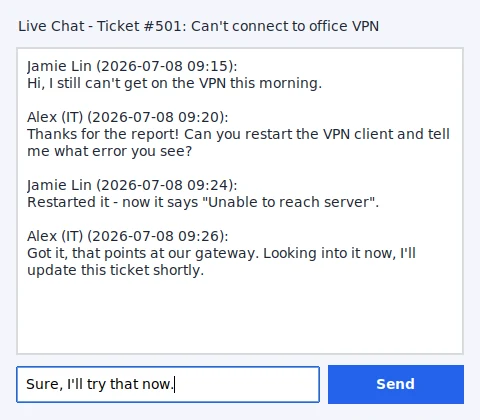
The user sees status changes and can chat with you from the same window.
- Notifications
- Live chat
Features
Small app, the right details
New ticket in seconds
A small window with subject, description, an optional category, a screenshot and a file attachment.
System info included
Hostname, operating system, user and local IP are attached to help diagnose the problem faster, and the user can untick it.
Linked to the right asset
The ticket is matched to the computer in RivetIT or RivetMSP by hostname.
Live chat
Chat with the technician on the ticket from the same window.
Works offline
Tickets submitted without a connection are queued and sent when it returns.
Know when it moves
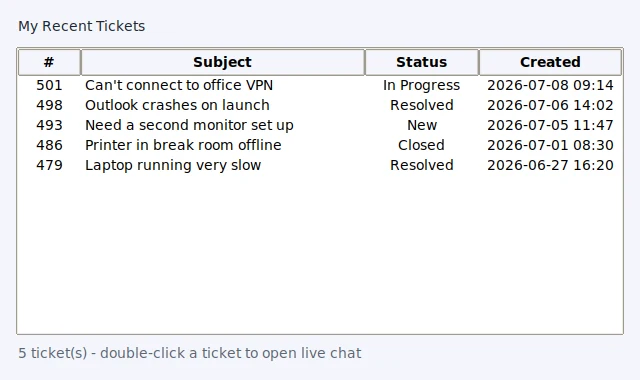
My Recent Tickets in the tray menu, and desktop notifications when a ticket changes status.
Your branding
Per-MSP accent color and logo.
Quick Tools
Public IP, ping, list printers, restart the print spooler or CUPS, and open network adapter settings.
Updates itself
A silent check for new releases, with a one-click download and install on Windows.
Platforms
Windows, macOS and Linux
Windows
Tray app with an installer that asks for the connection settings and a Tactical RMM deploy script.
macOS
Menu bar app with a LaunchAgent and an install script.
Linux
Tray app with an XDG autostart entry and an install script.
RivetPanel works with RivetIT and RivetMSP through their REST API, using an API key that is set at install time, so it needs a version of either product whose ticket API accepts attachments. It is still in development and not yet published; to try it or follow along, get in touch.
Want RivetPanel for your users?
It is in development. Tell us about your setup and we will let you know when it is ready.